Catch the messages that matter.
Star a message or set Highlights rules for names, phrases, and questions. Add chatter notes so you can remember the people behind the usernames.
BUILT FOR YOUR LIVE MOMENTS
One Overlay. Every Chat.
Stop chasing chat. Let chat come to you.
Bring Twitch, YouTube, Kick, and TikTok livestream chats together in a Windows app that fits your setup.
▦ v1.0.0 · Windows x64
Free app · Compact overlay + dashboard
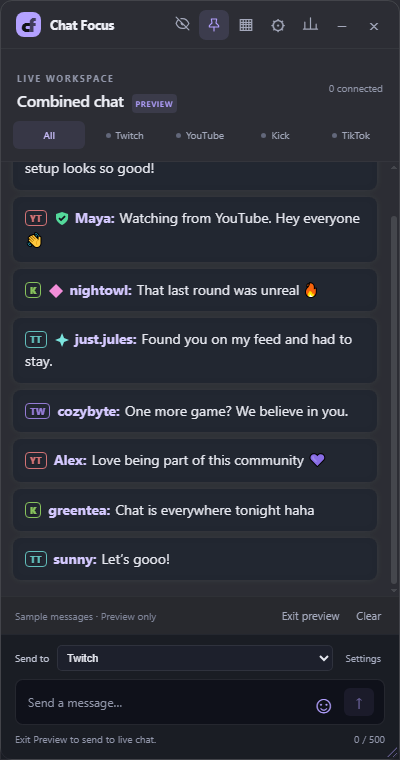
FOUR CONVERSATIONS.
ONE PLACE TO FOLLOW THEM.
01 / FIND YOUR VIEW
Stay close to the conversation with a compact overlay. Open the dashboard when you want room for the bigger picture.
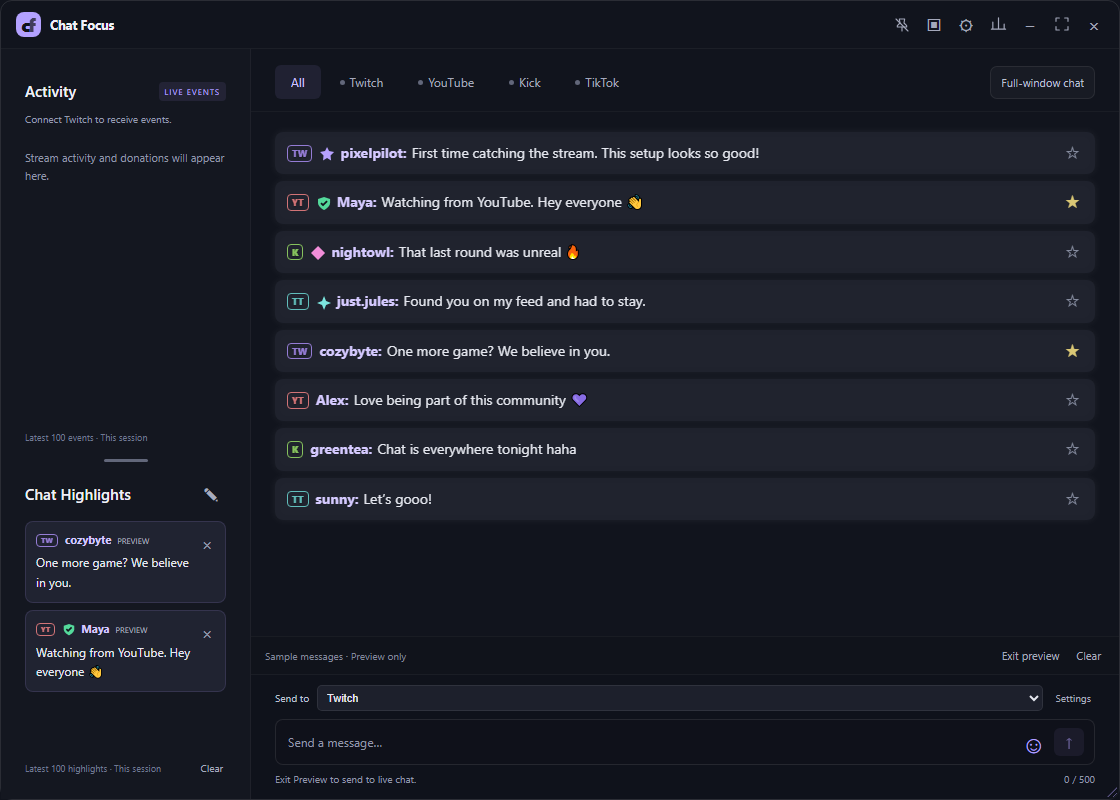
ROOM TO SEE MORE
Follow combined chat beside Activity and Chat Highlights. Keep important messages close, and your send-message bar within reach.
Screenshots show the actual app with illustrative sample messages. Platform features depend on account permissions and availability.
02 / KEEP THE GOOD STUFF CLOSE
A few thoughtful tools for the moments that matter—built into the same place you read your chat.
Star a message or set Highlights rules for names, phrases, and questions. Add chatter notes so you can remember the people behind the usernames.
Click a name to open moderation tools on Twitch, Kick, and YouTube. Filter bots, repeated messages, and other clutter with optional cleanup rules.
Use chat notification sounds and supported local speech features. Audio Commands is marked In Development, with improvements planned for a future update. Follow supported platform events alongside the conversation. Features vary by platform and account permissions.
Send messages on Twitch, Kick, and YouTube through connected accounts, with emotes and supported broadcast-detail controls within reach. TikTok currently supports chat viewing; login and sending are not included.
MAKE IT FEEL LIKE YOUR STREAM
Colors, image backgrounds, readable text, and your own shortcuts. Shape the overlay around your stream.
FROM ONE STREAMER TO ANOTHER
I created this app because I stream to multiple platforms, but I only have one monitor. Finding an app that was free and didn't have some hidden agendas or watermarks or something that I didn't like was basically non-existent. So I created it!
Aside from having all the major streaming platforms, I added an Always-on-Top feature which is great for single monitor streamers. You can see all your Chats tucked away in the corner of the screen while not blocking any gameplay visuals!
And I know people love customization so I added image uploads so people can create their own backgrounds for the Dashboard mode. Dashboard mode is for people with 2 or more screens.
But I hope you enjoy the app — Here is a link to Reddit to share how the app is and post some new feature ideas: r/ChatFocus
03 / FREE TO USE. SUPPORTED BY YOU.
Optional support helps me keep building Chat Focus. Choose a monthly amount or give one-time support. Supporting is never required to use the app.
Free
No paid subscription required to use Chat Focus.
Latest release: v1.0.0 · Windows x64 installer
HELP ME BUILD WHAT’S NEXT
Pick the amount that works for you. Every option supports the same goal: more time to improve Chat Focus.
Selected: $1.99 USD per month, billed monthly.
Choose an amount as a voluntary tip for the free app and its creator.
One payment, with no monthly billing. Leave blank to choose on Stripe. Minimum $0.50 USD; Stripe’s processing limits apply.
Stripe hosts checkout and takes your payment details. Monthly support renews automatically until canceled. Cancel future renewals through Stripe; cancellation takes effect at the end of the current billing period. These are voluntary support payments for the app, with no additional features. Full refunds can be requested within 14 days of each payment, including monthly renewal charges. For payment help or refund requests, email support@chatfocusapp.com. See the 14-day refund policy and support payment details.
04 / A FEW GOOD QUESTIONS
A clearer picture of what Chat Focus does—and what’s coming next.
That’s exactly what the compact overlay is designed for. Resize it, keep it always on top, or hide its interface to leave chat visible over your gameplay. Dashboard mode is there when you have more room.
Sending is implemented for Twitch, Kick, and YouTube through connected accounts. TikTok is currently for viewing chat; TikTok login and message sending are not included.
No. Moderation, polls, chat modes, and event alerts depend on what each platform supports and your account permissions.
Connection setup varies by platform. If you cannot connect an account, email support@chatfocusapp.com with your app version and affected platform. No payment or Chat Focus account is needed to download.
Chat Focus is free. No payment or Chat Focus account is required to download. Optional support uses Stripe-hosted checkout. Choosing an amount on this website does not charge you; review and confirm any payment on Stripe.
Yes. Chat Focus is free to use. If you want to support me and future development, you can choose an optional subscription of $1.99, $4.99, or $9.99 USD per month, billed monthly, or give one-time support of any amount you choose. Support is optional. Monthly support renews until canceled through the Stripe billing portal. Cancellation stops future renewals at the end of the current billing period. One-time support is a voluntary tip with no recurring billing. Read the support payment details.